Semantic search across everything you saved
Claude can search your library by meaning, not just keywords. Ask for "quotes about attention residue" and it pulls the passages that match, across books, articles, tweets, and videos.
Claude integration
Connect your Screvi library to Claude in 30 seconds. Ask questions, draft with real quotes from books and articles you saved, and rescue passages you half-remember from years ago.
Included with Screvi. Works in Claude web, desktop, and mobile. Not using Claude? See every supported client.
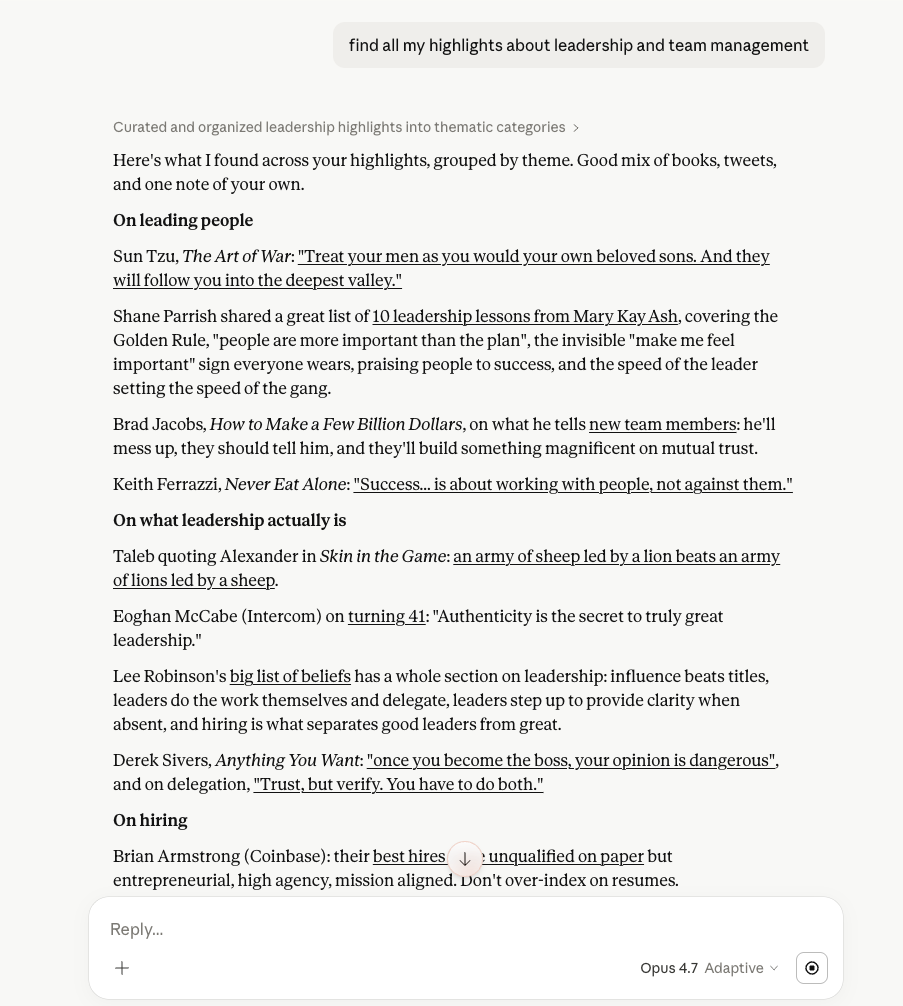
Most of what you highlight ends up sitting there. You save a quote, move on, and never see it again unless you go digging for it.
Claude with your Screvi library closes that loop. Your highlights stop being a pile you do not open and become material Claude can reach for while you are actually thinking about something (a blog post you are drafting, an argument you are refining, a half-remembered line from a book you read two years ago).
Screvi finds the material, Claude helps you think with it.
Twenty-three tools over the Model Context Protocol, behind OAuth. Reading is always on; saving, tagging, and organizing is a separate permission you grant.
Claude can search your library by meaning, not just keywords. Ask for "quotes about attention residue" and it pulls the passages that match, across books, articles, tweets, and videos.
Claude can fetch an entire book or article with every highlight you saved from it, so it can summarize a source, draft from one, or compare passages within it.
When Claude retrieves a highlight it gets the note you attached and the tags you gave it. Your annotations shape the answer, not just the raw text.
Read-it-later content is queryable the same way. Filter by author, publication, or reading status to pull exactly the articles you want Claude to reason over.
Authorization goes through Screvi login with OAuth 2.0 and PKCE, so Claude never sees your password. Read and write are separate grants, the token only works on the MCP server, deleted highlights go to the trash rather than disappearing, and you can disconnect from Claude or from Screvi settings at any time.
The connector follows the open Model Context Protocol standard. Works in Claude today, and in any other MCP-compatible assistant or agent that lets you add a server.
Three steps, about 30 seconds. You need a Screvi account and a Claude account.
The MCP Server URL you will paste into Claude:
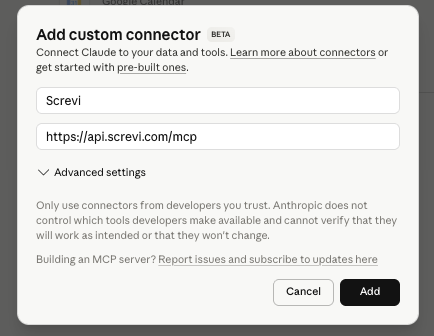
In Claude settings, go to Connectors and click "Add custom connector". This is a one-click link, no CLI or config files involved.
Name it Screvi and paste the server URL into the MCP Server URL field. Claude will validate it and show the Screvi login screen.
Log in and approve. The consent screen shows exactly what Claude gets: read access to your library, plus saving, tagging, and organizing if requested. Start a new chat and ask Claude anything about what you have saved.
The fun starts when you ask Claude something that would be tedious to answer yourself. Each one uses material already in your library, just buried.
What have I highlighted about pricing? Group by theme and cite the source.
Turns scattered passages into a structured brief you can actually use.
Find contradictions across the business books I have read.
Claude cross-references authors in your library to surface real tensions.
Draft a blog post about deep work using only ideas I have already highlighted.
Writing grounded in your own reading, with direct quotes and attribution.
I half-remember a quote about rivers and attention from a couple of years ago. Find it.
Semantic search rescues the passage you cannot quite recall.
Summarize what the Kahneman book in my library says about loss aversion.
Claude pulls the full source with every highlight and reasons over the lot.
Claude is a great model. With your highlights wired in, it stops guessing what you have read and starts reasoning over it.
| Area | Claude alone | Claude + Screvi |
|---|---|---|
| What Claude sees | Only its training data, cut off at a fixed date | Your highlights from books, articles, tweets, and videos |
| Where quotes come from | Paraphrased or hallucinated from training data | Actual passages you saved, with source attribution |
| Context for drafting | Generic advice disconnected from your thinking | Prose that reflects what you have read and marked up |
| Setup | Copy-paste your notes into the chat every time | One-time connector, 30 seconds, persists across chats |
Model Context Protocol is an open standard (created by Anthropic) that lets AI assistants connect to external data sources. Screvi runs an MCP server that exposes your highlights and articles, so Claude (or any other MCP-compatible client) can read them.
Your highlights, the sources they come from (books, podcasts, videos), your saved articles with their full text, and your notes and tags. If you approve write access, Claude can also save links, capture highlights, add notes and tags, and archive, favorite, or defer articles. It can move highlights to the trash, where you restore them, but it can never delete an article, source or tag, and every change is reversible in the app.
No. Screvi only sees the specific tool calls Claude makes (search queries, highlight IDs it requests). The rest of your conversation stays in Claude.
Open Claude settings, go to Connectors, find Screvi, and click disconnect. Or open Settings > API > Connected AI apps in Screvi, which cuts the connection off on the server side even if the client still holds a token. You can reconnect any time by repeating the setup.
Yes. Custom connectors added through Claude settings work across Claude on web, desktop, and mobile. One setup covers all of them.
Any MCP-compatible client can connect. The connector follows the open protocol, so the same URL works in other assistants that support custom MCP servers.
Yes. The MCP connector is included with Screvi at no extra cost. If you do not have an account yet, you can start a 14-day free trial with no credit card.
Claude has a free tier that works with custom connectors. A paid Claude plan gives you longer conversations and higher usage limits, but the Screvi connector itself does not require one.
Create your account, add your highlights and see how Screvi can change the way you read.