Screvi Changelog - September 2026
Hello! And welcome back to another Screvi update. This is the biggest Screvi update of the year.
Almost all of it was shaped by your feedback and the conversations I had with many of you this month. Thank you to everyone who wrote in, sent a bug report or talked with me. This update is built on what you told me.
UI Updates
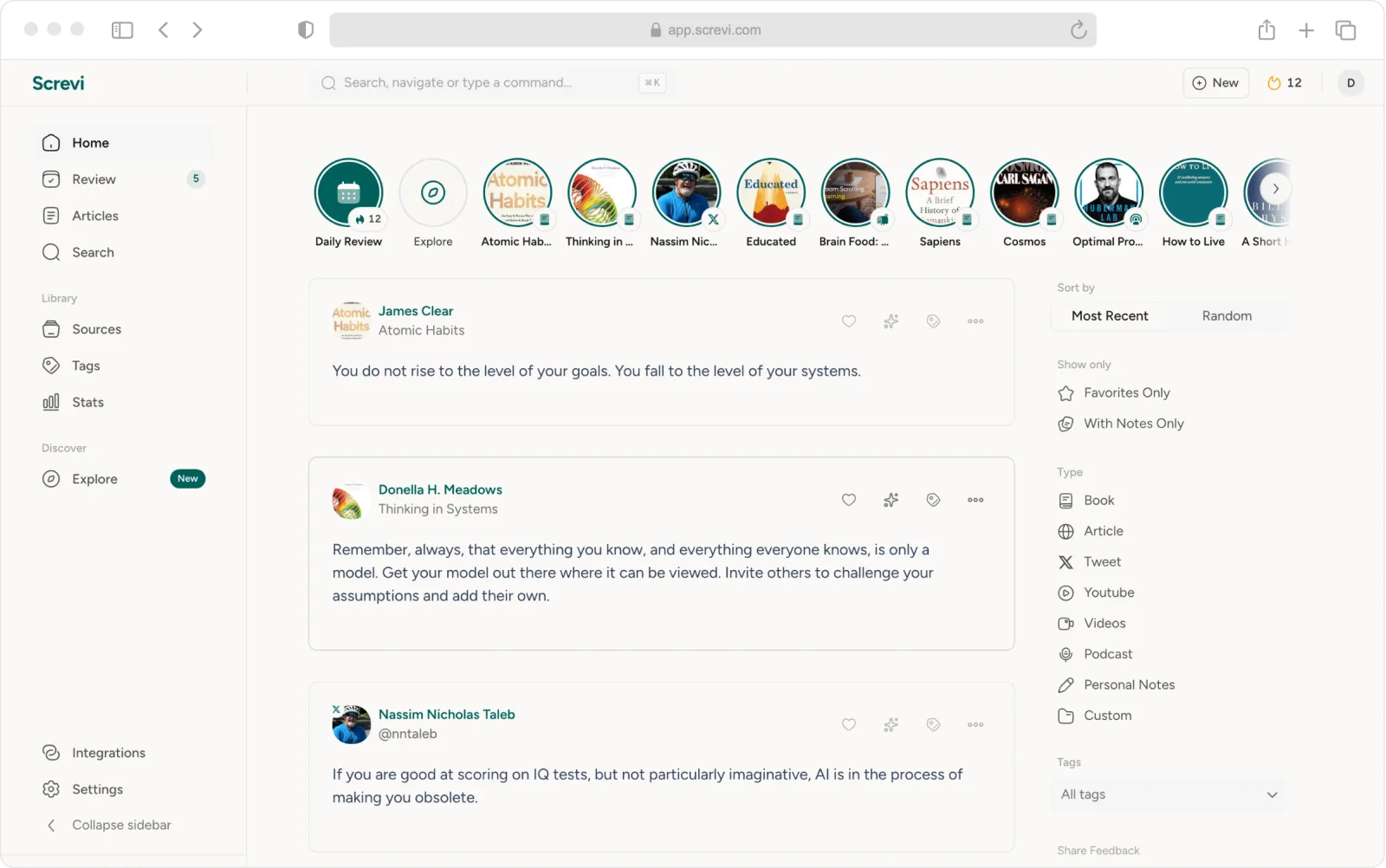
Screvi started as a home for book highlights. Today it is also where you read articles, newsletters, PDFs and books, listen to podcasts and follow feeds, and the old layout was running out of room for all of it. So the web app got a new one: a sidebar that keeps everything one click away, and a "+ New" button that saves an article, adds a book or writes a highlight from anywhere.
A Smarter Screvi
Good AI should work like good typography or a well-edited book: you don't notice the work, you just read better. That's the kind of AI I want in Screvi. Nothing to set up and nothing competing for your attention, just a library that quietly gets better at bringing back what's worth your time. This month's two new features were built exactly that way.
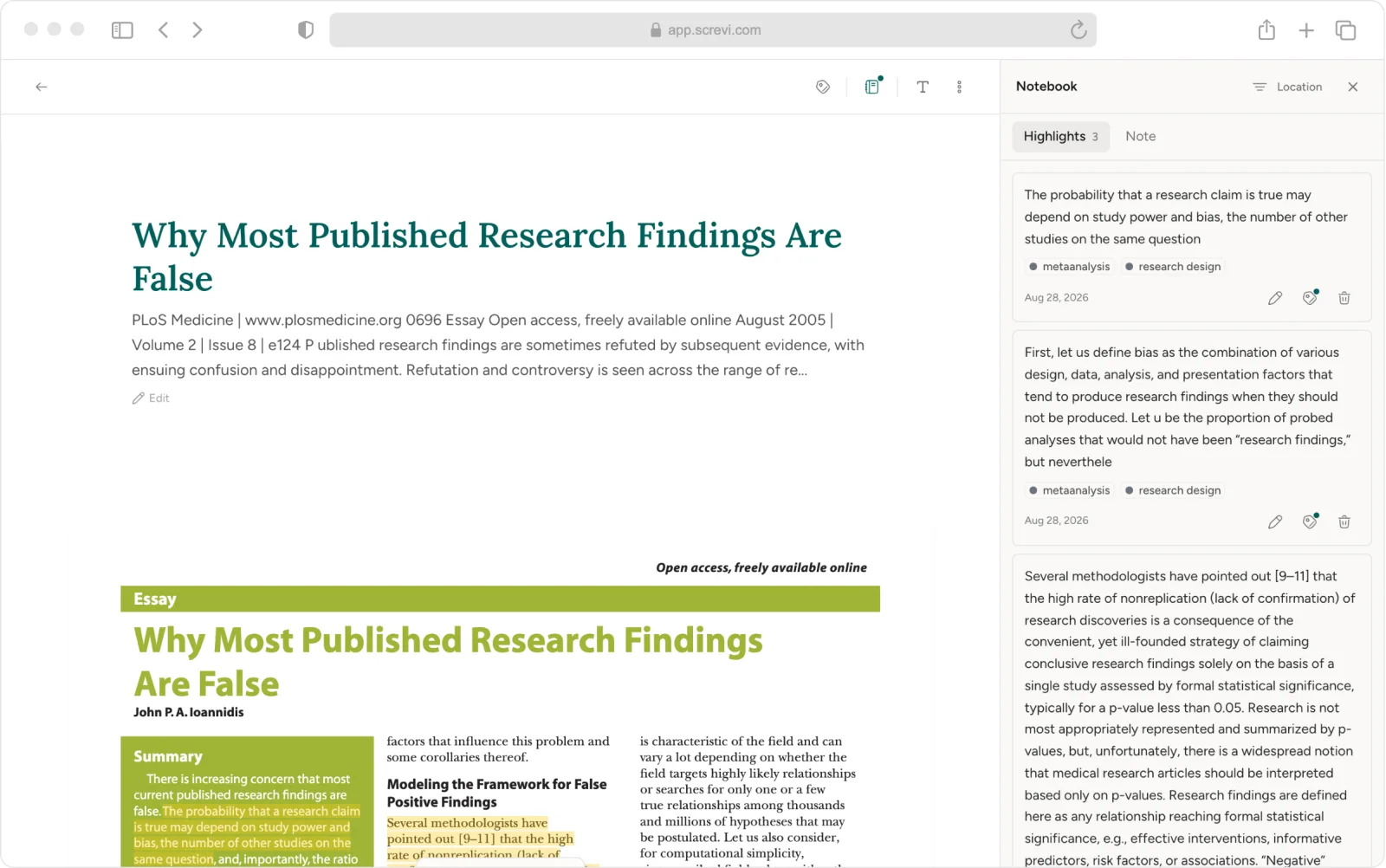
Suggested highlights. The hard part of a long article is noticing what is worth keeping. Screvi now marks a few passages you would probably highlight, based on what you have highlighted before, and saving one takes a single click.

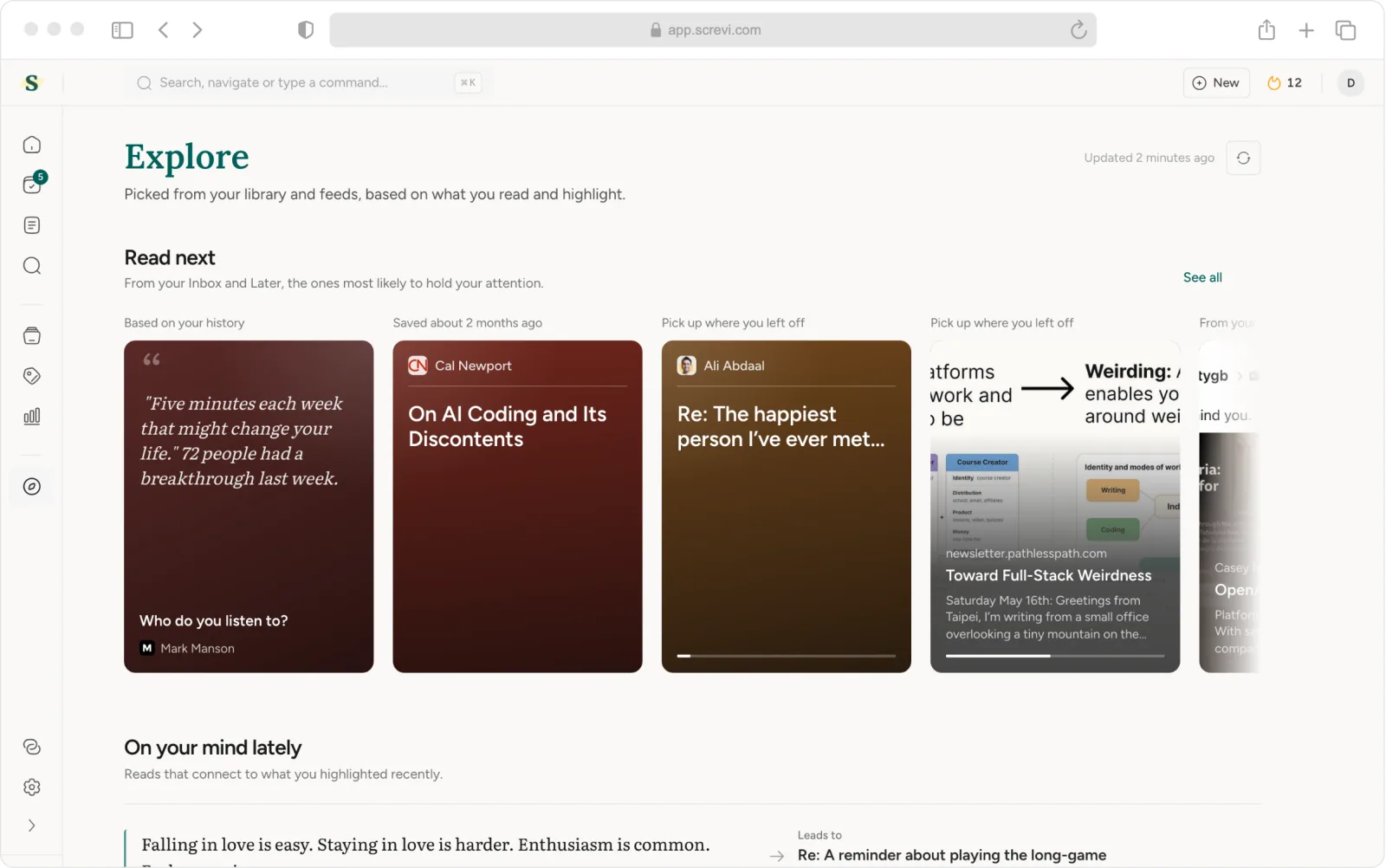
Explore. Most of what we save never gets read. Explore picks the few things worth your time today: what to read next from your inbox, the best of your feeds, and passages from your library that connect to what has been on your mind. Find it in the sidebar or behind the compass in your Stories row.
Better Article Saving
Few things are more annoying than saving an article and opening it later to a cookie wall, or to half of it. A lot of this month went into making saves arrive whole: paywalled pieces upgrade from an archived copy when one exists, newsletters keep their images, and the clutter around an article stays out.
A Better Reader, Especially for PDFs and Books
If you read PDFs in Screvi, this is the update you were waiting for. Highlights now sit exactly on the text, your place follows you from laptop to phone, and a big file shows its first page in about two seconds instead of ten. Books got the same care: EPUBs open in the same calm reader as your articles, with your highlights and notes beside the page.
Share Your Books and Highlights
Your library is now easier to share with friends:
- Share a book with your highlights, so friends see what stood out to you.
- Build a shelf, like a wishlist or your favorites of the year, and share the whole collection with one link.
Every book also has a reading status now: Want to read, Reading or Read. Connect Goodreads and it stays in sync on its own.
Screvi 2.0 for iOS and Android
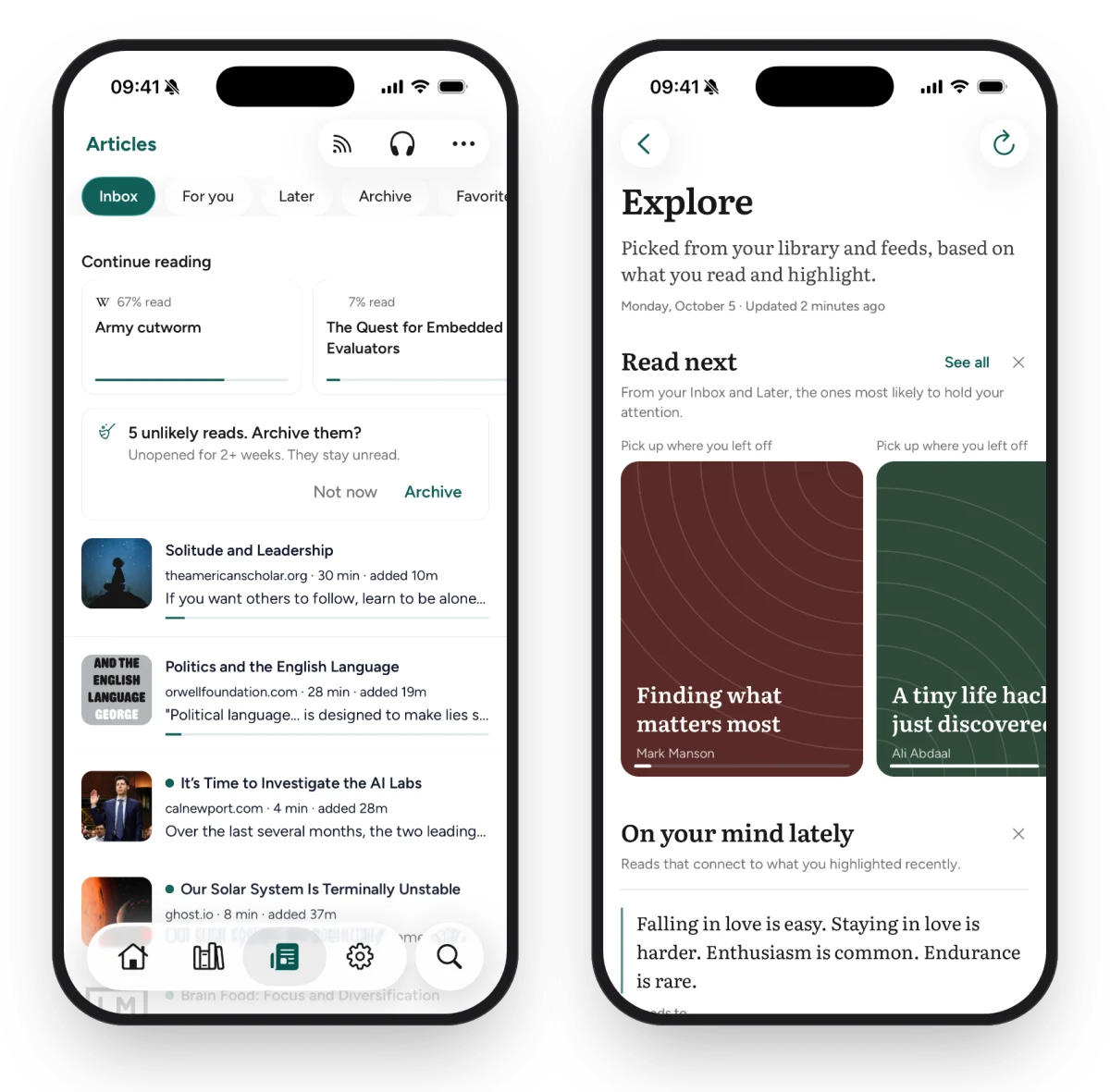
All of this comes to your phone too. Screvi 2.0 brings the new Articles and reader, Explore and suggested highlights to iOS and Android. Android 2.0 is rolling out now, and iOS follows as soon as App Store review is done.
A Few More Things
- Telegram: forward posts and links to the Screvi bot and they land in your library, filed under the channel or person who wrote them.
- Zotero import is here, next to Kindle, Kobo, Readwise and the rest.
- CSV export joins HTML and Markdown.
- Arabic and Hebrew read right to left everywhere, in the reader, the feed and highlight cards.
- Library tools in Settings preview each clean-up before you run it.
- Review lets you pick the session size, and opening the review email now counts toward your streak.
- Fixes include the Kobo and Apple Books importers failing to load, highlight editors crashing, and the feed stopping after a while.
The rest of the month, in full.
Other Improvements
The new web app
- [WEB] Articles has a rail with Inbox, For you, Continue reading, Later, Archive and RSS. Quick reads show what you can finish in five minutes, and a declutter card offers to archive what you are unlikely to read, with undo.
- [WEB] Sources has a rail too, a Book view with status and shelves, and filters for origin, file type, notes, favorites, tags, dates and duplicates.
- [WEB] Add Source is one dialog: search for a book, upload an EPUB or PDF, or enter it by hand. It matches books you already have instead of creating duplicates.
- [WEB] Add and edit highlight share one composer with smart paste, Cmd+Enter to save, and drafts that survive closing it.
- [WEB] The command palette (Cmd+K) was rewritten with fuzzy search, a top hit and recent items.
- [WEB] Stats has a new layout, correct counts and a rebuilt share card.
- [WEB] Pricing and billing are clearer, with a monthly/yearly toggle, Lifetime on the same page, and a heads-up before your trial ends.
Reading
- [WEB] The reader has a slimmer toolbar, a floating bar for previous, next, later, archive and favorite, and one side panel for your highlights, notes, summary and info. On mobile the panel is a bottom sheet.
- [WEB] EPUB and PDF books open in the article reader, with a page slider, contents, a notebook and book info. Page turns no longer freeze, your place stays put when you resize or change the font, and opening a finished book no longer marks it as Reading again.
- [WEB] YouTube transcripts follow along as the video plays, arrow keys step line by line, and Cmd+F searches the transcript.
- [ALL] Suggested highlights can be turned off in the reader settings, and the setting syncs between web and mobile.
- [WEB] Explore has a "Lately on X" row with recent posts from people you follow on X, each with a Save button.
- [WEB] PDF highlights line up with the text at every zoom level, and can cross a page break.
- [WEB] Your place in a PDF is saved, including when you close the tab, and follows you between devices.
- [WEB] Large PDFs open much faster. The first page of a big file went from about 10 seconds to 2 on a slow connection.
- [WEB] PDFs have a dark pages toggle, and scanned PDFs tell you when a page has no selectable text.
- [WEB] Arrow keys resume from where you scrolled, instead of jumping back.
- [WEB] Typed section breaks like
* * *show as a short divider. - [WEB] Video chapters become the reader's table of contents, and video progress is how far you watched.
- [WEB] The note on an article docks to the side and saves as you type. Lists show which articles have a note.
- [WEB] Links in the reader show a preview card when you hover them.
- [WEB] Paywalled saves show when Screvi is upgrading them from an archived copy.
- [WEB] Newsletters show unsubscribe and web-version links, and pending subscription confirmations appear above the feed.
- [WEB] A margin control joins the typography settings.
- [WEB] A quoted post inside a saved X post shows as a card.
- [ALL] Reader themes and the suggested highlights setting sync between devices.
- [ALL] Search matches curly apostrophes and dashes the same as straight ones.
Article saving
- [ALL] Paywalled articles are upgraded from an archived copy when one exists, and the reader tells you when that happened.
- [ALL] Newsletters keep their images, lose tracking pixels and broken email styles, and keep their unsubscribe and web-version links.
- [ALL] Cookie and consent walls, sign-up boxes and site clutter are left out, while figures, diagrams and lead images are kept.
- [ALL] Saving the same link twice no longer creates a duplicate, even with tracking parameters on it.
- [ALL] Titles you edited survive a re-fetch.
Highlights and review
- [WEB] The highlight page has a new layout with the source image up front.
- [WEB] Each review card shows similar highlights from your library.
- [ALL] Review scheduling was rewritten. Re-grading a card replaces the old grade instead of stacking, and "Review more" always brings fresh cards.
- [ALL] One grace day before a streak lapses.
- [WEB] Tag suggestions rank your existing tags first.
- [WEB] Tags can be merged and deleted in bulk.
Library and imports
- [WEB] A shared book shows your highlights. Anyone with the link sees the first five, and the rest after signing in.
- [ALL] Goodreads sync keeps reading status up to date every night once auto-sync is on in Integrations.
- [WEB] Reading status for every book (Want to read, Reading, Read), with a filter in Sources.
- [WEB] Shelves live in the Sources sidebar. Each one can stay private or be shared with a link.
- [WEB] A public profile at app.screvi.com/u/yourname, set up in Settings > Profile, with what you're reading, your shelves and shared highlights.
- [WEB] Drag an EPUB onto Sources to add the book.
- [WEB] Personal Notes can no longer be deleted by accident.
- [WEB] Kobo import lists books it skipped because you had deleted them, and offers to restore them.
- [WEB] Exported highlights link back to Screvi.
- [WEB] A failed Kindle import links straight to the Kindle notebook sign-in for your region.
- [ALL] Importing the same book twice at once no longer creates a duplicate.
Screvi 2.0 for iOS and Android
- [MOBILE] A redesigned feed, Articles and reader, with undo on every swipe and a reader bar for previous, next, later, archive and favorite.
- [MOBILE] On iOS 26, headers and the Articles tabs use Liquid Glass and float over your content.
- [MOBILE] A new Stats page, and Explore as the first bubble in Stories.
- [MOBILE] AI suggested highlights in the reader, the same as on the web.
- [MOBILE] Highlight on release: lift your finger and the highlight is made, with undo. Reader margins are adjustable.
- [MOBILE] The AI assistant keeps a thread of follow-up questions, and Ask AI is in every highlight's options.
- [MOBILE] Long press an item in Continue reading to remove it.
- [MOBILE] Links in the reader open a preview sheet, and the highlight page was reworked.
- [MOBILE] Offline articles are searchable.
- [MOBILE] The book scanner has an Extract all button, says what it will do, and tells a blocked extraction apart from a dark photo.
- [MOBILE] Highlights can read the text out of their pictures, or drop them.
- [MOBILE] The share sheet accepts PDFs, and long quotes shrink to fit on share images instead of being cut off.
- [MOBILE] Instagram reels and tweet videos play inside highlight cards, and image-heavy highlights get an image slider.
- [MOBILE] CarPlay fixes, and the reader follows the app theme instead of the system one.
Account and apps
- [WEB] Settings > API lists the AI apps connected to your library, and lets you disconnect them.
- [MOBILE] app.screvi.com links open in the app.
- [WEB] Pinch zoom works on phones and tablets, and tapping a field on iPhone no longer zooms the page.
- [WEB] Bug reports from the mobile app include the app version and device, so we can fix them faster.
Bugfixes
- [WEB] Fixed an issue where Kobo and Apple Books imports failed to load.
- [WEB] Fixed an issue where every highlight editor crashed.
- [WEB] Fixed an issue where the feed stopped loading after a while.
- [WEB] Fixed an issue where Stats counted articles as sources.
- [WEB] Fixed an issue where signing up or logging in with an email code could leave you signed out.
- [WEB] Fixed an issue where a cleared author name came back.
- [WEB] Fixed an issue where notes were hard to read in dark mode.
- [WEB] Fixed an issue where choosing the light theme did not stick.
- [WEB] Fixed an issue where the reader showed stray zeros in the article meta line.
- [ALL] Fixed an issue where EPUB highlights lagged while the page re-anchored them.
- [ALL] Fixed an issue where some newsletters showed tracking pixels and broken styles.
As always, if you have any issues or feedback, let me know.
Happy reading ✌️
Pedro @ Screvi